MacroPoint for Truckers
- 4.5
- Rating
- 1.00M
- Installs
- Free
- Price

 Analysis by App-foxy
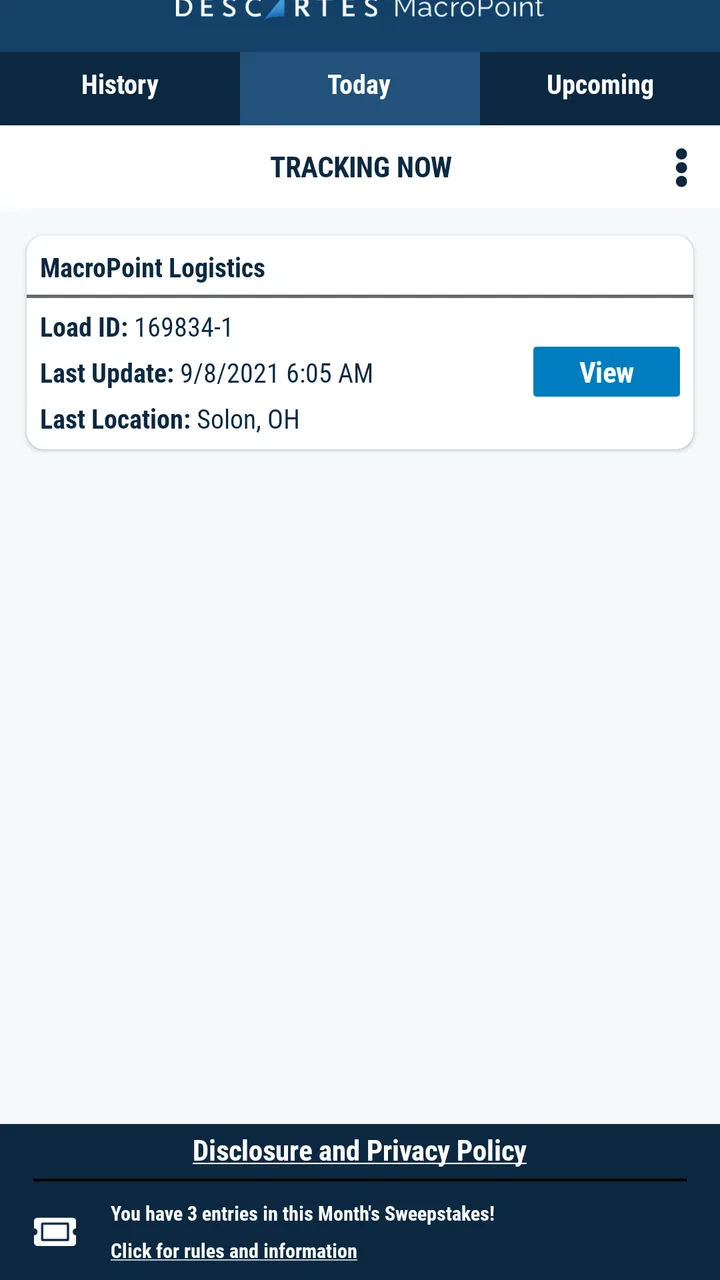
When a trucking app is installed on a phone that other people also use, the real question is not simply whether it shows a route. The important question is whether it supports a clear working routine without confusing the driver, the household, or the people waiting for a delivery. After spending time with MacroPoint for Truckers, I see it less as a traditional navigation tool and more as a communication layer for freight movements. Its purpose is to help partners understand when a trip is starting, when a vehicle has arrived, and where the load is moving.
That distinction matters. A driver looking for turn-by-turn directions, fuel stops, or a complete trip planner may expect something closer to a conventional navigation app and could be disappointed. A carrier, owner-operator, dispatcher, or household member trying to understand the status of a shipment has a different need. In that situation, the app’s focus is much more practical: reducing the need for repeated calls and making transport progress easier to coordinate.
The app is free, belongs to the Maps & Navigation category, and comes from Descartes Intl. It has built a strong presence on Android, with over a million installs and a 4.5 average from around sixty-six thousand ratings. Those figures suggest that it is not a niche experiment, but they do not remove the need to understand its workflow before putting it on a shared phone.
You May Also Like

 Blood Strike: 2.5 Anniversary
Blood Strike’s Loadouts Turn Every Drop Into a Tactical Gamble
A close look at Blood Strike’s custom loadouts: how fast access to signature weapons reshapes its battle royale rhythm, rewards preparation, and narrows the gap between fights.

 Pandora - Music & Podcasts
Pandora’s Music Is Easy to Start, but Harder to Recover
Pandora’s strength is its low-effort path from a seed to a station. Its weak spot is how much confidence it asks you to place in connection, setup, and quiet recovery.

 8 Ball Pool
 Is Built on Rivalries, Rematches, and Routine
A close look at the rivalries, rematches, shared routines, and unanswered safety questions that turn a quick pool match into a persistent mobile community.

 Samsung Music
’s Quiet Strength Is Playing What You Already Own
Its reach comes less from spectacle than from dependable access to a personal library. That simplicity is both the app’s strongest retention engine and its ceiling.

 AccuWeather: Weather Radar
AccuWeather Review: A Quick, Clear Forecast for Everyday Decisions
For everyday plans, the best forecast is the one you can understand quickly. AccuWeather makes rain timing, radar, and local conditions easy to act on, with a few trade-offs.

 Hill Climb Racing
Why Hill Climb Racing Still Turns Crashes Into One More Run
A tiny car, a bumpy hill and one more upgrade: Hill Climb Racing keeps resurfacing because its simple chaos makes every near-miss feel personal.
More From Our News Desk



How MacroPoint fits into a shared trucking routine
A realistic household example is an owner-operator who keeps one phone for work and personal use. During a delivery day, a partner at home may need to know whether the driver has left, reached a pickup point, or is still moving toward the destination. Instead of asking for a message after every change, the app can serve as the work-focused channel for those arrival, departure, and location updates.
I find that especially useful when the person at home is coordinating practical matters around the trip. They may be arranging a repair appointment, preparing a delivery window, or simply trying to decide whether a call is appropriate. The value is not entertainment or route discovery; it is shared awareness around a moving job.
There is also a useful boundary here. The app is designed around communication with partners, not around giving every person in a household an unrestricted view of a driver’s day. I would treat it as a professional tool first. If a family member uses the same device, they should know when the app is active for work and avoid changing its settings or interrupting its workflow while the truck is operating.
That approach prevents a common mistake: treating a shared device as if every app has the same audience. A navigation app may be opened casually by anyone in the car. A shipment-communication app can affect dispatch expectations and customer coordination, so accidental changes have more serious consequences.
What the app actually contributes
The strongest part of the experience is the connection between movement and communication. MacroPoint automatically communicates arrival, departure, and location to partners, which can make a trip easier to follow without relying entirely on manual updates. For a driver, that can mean fewer repetitive status calls. For a dispatcher or logistics contact, it can mean a clearer view of the transport process.
In my experience, the practical benefit depends on everyone understanding what the updates mean. An arrival signal is not the same as unloading being complete. A departure signal does not necessarily mean the driver is already on the fastest route. Location information helps with coordination, but it should not be treated as a promise of an exact delivery time unless the responsible partner has confirmed that separately.
This is one of the app’s less obvious trade-offs. Automation can reduce communication work, but it can also encourage people to overinterpret a status. I would use the automatic information as a shared reference point and keep direct messages or calls for exceptions, delays, access problems, and changes to the plan.
Setting it up without blurring personal and work use
On a shared phone, setup deserves more attention than it might receive on a dedicated work device. I would begin by deciding who is responsible for the account and who is allowed to change anything inside the app. That could be the driver, a fleet contact, or another clearly selected person. The important part is not the household relationship; it is having one accountable user.
I would also avoid letting a casual user explore the app during an active trip. Even without deliberately changing anything, opening screens, dismissing prompts, or switching away at the wrong moment can create confusion. The safest household routine is simple: the driver handles the work session, while other people use the phone only when the trip is inactive or when the driver has explicitly handed it over.
This does not mean the app is unsuitable for shared devices. It means the device needs a work boundary. Keep personal conversations and unrelated apps from competing with transport tasks, and make sure the person who drives knows how to return to the expected MacroPoint screen before starting work.
Because the current version is 25.10.08 and the minimum operating system is Android 6.0, the compatibility range is broad enough for many older Android phones. I would still test the complete routine before relying on it for a time-sensitive load. Compatibility is not the same as a comfortable experience on every handset, especially when an older phone is also handling calls, messages, and other navigation tools.
Coordination is where the app earns its place
The app makes the most sense when several people need the same transport information but do not need to speak constantly. A dispatcher can use the movement updates to plan the next conversation. A logistics partner can prepare for an arrival. Someone at home can understand why the driver is unavailable without calling repeatedly.
A useful workflow is to agree on what requires a call before the trip begins. For example, automatic movement updates can cover ordinary progress, while a phone call is reserved for a changed appointment, a problem at the facility, or a delay that affects the next commitment. This keeps the app from becoming a substitute for judgment.
Another practical tip is to pair the app’s status information with a simple human check when precision matters. If a customer is asking whether unloading has finished, the automatic arrival event alone may not answer that question. The driver or responsible partner should confirm the operational detail directly rather than expecting location data to explain every stage of the job.
That is also why I would not compare MacroPoint directly with Google Maps, Apple Maps, or a truck-specific route planner as though they were identical products. Those alternatives are built around finding roads and guiding a driver. MacroPoint is better understood as a transport-status and partner-communication tool. In many professional routines, the best arrangement may be to use a navigation app for driving decisions and MacroPoint for the people who need to follow the load.
Where it is helpful and where it becomes the wrong choice
For owner-operators and small carriers, the app can reduce the pressure of manually reporting every ordinary movement. It is also a sensible fit when a partner needs visibility but does not want a long stream of personal messages. In a household, that can make work communication less intrusive: the driver can concentrate on the road while the other person checks the agreed channel instead of interrupting.
For a dispatcher, the benefit is strongest when the information is used to organize work rather than to monitor every minute. A good coordination process respects the difference between a useful status and unnecessary pressure. If people respond to every location change with a call, much of the app’s convenience disappears.
I would be more cautious about recommending it to someone who only wants directions. The name and category may suggest navigation in the broad sense, but its role is not to replace a full route-planning app. It also may not suit a household that is uncomfortable with work-related location communication or that cannot agree on who controls the account and device.
There is a second limitation for shared use: context can be lost. A family member seeing that the truck has arrived may assume the driver is free, even though the driver could be checking in, waiting for a dock, handling paperwork, or dealing with a safety issue. The app can improve awareness, but it cannot explain every human detail behind a status.
Age, trust, and the meaning of visibility
The content rating is Everyone, which makes the app broadly suitable from an age-classification perspective. That does not mean every child or casual household user should manage it. The more important issue is trust and responsibility. Location and trip information should be handled by people who understand why it is being shared and who can distinguish professional coordination from personal tracking.
If a teenager occasionally uses the same phone, I would keep the rule clear: they can use the device for ordinary personal tasks when the driver is not working, but they should not open, alter, or interpret active transport information without permission. This is not about adding imaginary parental controls; it is simply a sensible account boundary for a work tool.
The same principle applies between adults. A partner may need to know whether a delivery is progressing, but that does not automatically make them the person who should change the work setup. Shared access should be based on a defined responsibility, not on the assumption that everyone in the household has the same operational role.
I appreciate that this way of thinking keeps the app useful without turning it into a household surveillance system. Its value comes from agreed coordination. If the people involved do not trust one another or cannot establish limits around location information, the technology will not solve that underlying problem.
Questions I would settle before depending on it
The first question is whether it replaces a truck navigation app. My answer is no. I would use a dedicated navigation solution for roads, routing, and driving guidance, then use MacroPoint for communicating trip progress to partners. If someone installs it expecting fuel planning or turn-by-turn instructions, they are choosing the wrong tool.
The second question is whether a driver must manually message every status. The app’s purpose is to automatically communicate arrival, departure, and location information, so it can reduce routine reporting. Still, I would not assume automation covers unusual situations. A delay, facility problem, route change, or completed unloading may need a direct explanation.
The third question is whether it works well on an older shared phone. Android support begins at version 6.0, which is helpful for keeping an existing handset in service. My advice would be to test it while the phone is being used normally for calls and driving-related tasks. A technically compatible phone may still be inconvenient if its battery, screen, or general performance is poor.
The fourth question is whether it is appropriate for a family member who is not involved in trucking. It can be useful for that person as a source of agreed trip awareness, but I would not make them responsible for interpreting every update. They should know the communication rules and when to contact the driver, while operational decisions remain with the driver and professional partners.
The final question is whether the app is worth using for occasional private travel. In my view, its strengths are tied to freight coordination. For a personal road trip, a normal navigation app is likely to be simpler and more relevant. MacroPoint earns its place when a moving load needs to be communicated to other people.
My household verdict
After looking at it through both the driver’s routine and the shared-device angle, I would recommend MacroPoint for Truckers to people who need a focused way to communicate transport progress with partners. Its free price lowers the barrier to trying it, and the 4.5 average from a large group of users gives it reassuring public feedback. Descartes Intl. has also kept the product current enough to identify it by version 25.10.08 rather than an abandoned release.
My recommendation comes with a clear condition: define the boundaries before relying on it. Decide who controls the work account, explain what arrival and departure updates do and do not mean, and keep direct communication available for exceptions. On a household phone, make sure personal users understand that an active trip is a work session, not an invitation to browse or adjust settings.
The best way to think about MacroPoint is as a coordination bridge, not a complete driving companion. It can make routine status sharing lighter and help a household or logistics team understand the broad movement of a load. It is less convincing as a standalone navigation solution, and it cannot replace trust, context, or a direct conversation when something unusual happens.
For a professional driver who wants partners to receive meaningful movement updates without constant manual reporting, I think it is worth trying. For someone seeking ordinary maps, route discovery, or a casual family location tool, I would choose a different category of app. Used within its proper boundaries, this one has a practical role: keeping the right people informed while leaving the driver free to focus on the road and the job.
FAQs for MacroPoint for Truckers
01What is MacroPoint for Truckers and how does it work?
MacroPoint for Truckers is a mobile application designed to enhance communication and logistics for truck drivers. It works by allowing drivers to share their location and load status with dispatchers and shippers in real-time. This helps streamline operations, reduce waiting times, and improve overall efficiency in freight management.
02Is MacroPoint for Truckers free to use?
While the MacroPoint app itself is free to download, its usage may depend on agreements between trucking companies and their logistics partners. Some companies may cover the cost of using the app as part of their operational expenses, while others might require drivers to handle the cost. Check with your employer for specifics.
03What are the system requirements for using MacroPoint for Truckers?
MacroPoint for Truckers is available for both Android and iOS devices. For Android, your device should be running version 5.0 (Lollipop) or later, and for iOS, version 10.0 or higher is required. Ensure your device has sufficient storage and a stable internet connection for optimal performance.
04How does MacroPoint for Truckers ensure data privacy and security?
MacroPoint prioritizes data privacy and security by using encryption protocols to protect user information. Location data is shared only with authorized parties involved in the transportation process. The app complies with industry standards and regulations to safeguard personal and operational data from unauthorized access.
05What are the benefits of using MacroPoint for Truckers?
The app offers numerous benefits, including improved communication with dispatchers, real-time tracking of shipments, and reduced paperwork. Drivers can receive timely updates and instructions, which helps minimize delays and optimize route planning. Overall, it enhances operational efficiency and driver satisfaction.
Pros
- User-friendly interface for quick navigation.
- Real-time tracking enhances delivery accuracy.
- Easy document upload for seamless processing.
- Customizable alerts for timely updates.
- Integration with major logistics platforms.
Cons
- Requires constant internet connection.
- Limited offline functionality.
- Occasional GPS inaccuracies reported.
- High battery consumption during use.
- Subscription cost may be high for small operators.

MacroPoint for Truckers
Gallery